 Wall prints are some of my favorite things to create and sell. People are always on the hunt for new things to hang on their walls, and the only limit to what you can create is the limits of your own imagination. Pretty cool, right?
If you’ve been using AI to create images, you know that it can be both fantastic and frustrating. Sometimes you get exactly the right image on your first try. At other times, endless refinements to your prompt may still result in a clunker.
The key to getting the right images for wall art and other products without a ton of fuss is understanding how to fine-tune your AI image prompts. Let’s explore how AI prompts work and look at 7 tips to improve your images.
How AI Prompts Work
AI prompts are the input you provide to get generative AI tools such as ChatGPT or Perplexity to generate the content you want. They can range from simple to complex. The more care and attention you put into your prompts, the better your result will be. At the same time, the content you get from a basic prompt can serve as inspiration – a jumping-off point for innovative ideas and products.
Think of an AI prompt as an order. You’re telling whatever AI tool you’re using what you want and expect. Specificity matters. In many ways, generative AI is like a child, in that its interpretation of your prompts may be quite literal. When your prompt isn’t explicit, you may get comical or frustrating results.
How to Fine-Tune Your AI Image Prompts
Here are some helpful tips and tricks to help you fine-tune the prompts you use to get the best possible results.
#1: Include All Basic Elements of the Image You Want
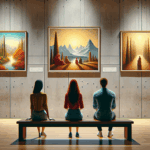 One of the most common mistakes when creating an AI image prompt is not including details about the various aspects of the image you want. These include:
- The image type (photograph, illustration, cartoon, product mockup)
- The main subject of the image (a product, person, object, or animal)
- What’s behind the main subject, aka the background (a city street, a backyard, a canyon, or a beach)
- The composition style (bright lighting, sunlight, warm tones, realistic, etc.)
Including descriptions of each element of the image you desire will help the AI tool deliver a specific result that meets your expectations.
#2: Avoid Wordiness
While you want to include details about the image you want, it’s important not to be overly wordy. Long sentences with unnecessary words are likely to confuse generative AI tools and result in muddled or weird images.
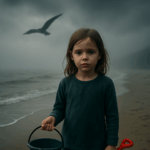 Let’s look at two examples, starting with one that’s too wordy to be effective:
A hyper-realistic photo of a young girl with an eerie background of a beach on a foggy day with looming clouds and weird lighting, she’s holding a bucket and shovel, and there’s a big and menacing bird headed toward her.
Here’s a version that’s more likely to get a good result:
A photo of a little girl holding a bucket and a shovel on a beach on a cloudy day, with a menacing sky and eerie lighting.
The issue with the first one is that there are just too many things for AI to interpret, whereas the second one focuses on the most essential elements of the image.
#3: Put the Most Important Image Requests First
Another common mistake is putting the primary image you want toward the end of the prompt or buried in the middle, making it easy for AI to get the focus wrong. If you want an image of your product, say that up front to make sure the tool you’re using knows that’s the most important thing.
#4: Avoid Metaphors and Stick to the Literal
One of the things that generative AI isn’t good at – yet – is reading between the lines of a prompt. If you get too metaphorical or abstract, or ask AI to interpret what you mean, you’re likely to end up with an image that misses the mark.
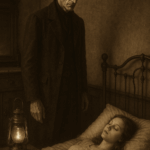 Instead, be as literal as possible to get the best results. Let’s say you’re looking for an illustration to use on an educational printable focusing on the themes in a public domain book, such as Dracula. You might use a prompt like this:
A tall man with dark hair and a narrow face stands over a pale young woman in bed, antique furnishings, lantern light, a sepia-toned photographic style.
You may need to try a few versions to get the exact image you need, but being specific will make the process seamless and quick.
#5: Don’t Contradict Yourself
 AI tools will get confused if your prompt is contradictory because they won’t know which cue to follow. Here are a few examples of what we mean when we talk about contradictory prompts.
- Vintage-style vs high-resolution
- Eerie background vs brightly lit
- Minimalist vs detailed
You see what we mean. AI will interpret each instruction you include in your prompt, and if you’re not careful, you can end up with something that doesn’t meet any of your expectations.
#6: Fine-Tune Images by Adding Specifics
Editing images can be a frustrating process if you don’t know how to do it. If you want to avoid wordiness, you may want to start with a basic image and then provide editing suggestions to the AI tool you’re using. Here’s an example of how that might work.
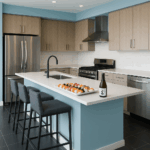
- A high-quality photo of a modern kitchen with stainless steel appliances, a black tile floor, and an island with bar stools around it.
- Change the wall color to light blue.
- Add a platter of assorted sushi and a bottle of sake to the island.
Each edit you make will allow the AI tool to update the image and make it more to your liking.
#7: Save Successful Prompts
Our final suggestion is to save your most successful prompts for future use. You’ll need to change the details, of course, but once you’ve got the wording down, it will be quick and easy to edit it for re-use.
Our point here is that it’s a waste of your valuable time to engineer each prompt from scratch. Take shortcuts wherever you can find them to streamline your image generation process!
Fast-Track Image Generation with Intelligent Prompts
The 7 prompt-writing tips we’ve included here can all help you get the images you want as quickly as possible – which means you’ll be able to create products rapidly and avoid wasting time.
Are you in need of some assistance creating AI-generated wall art to sell? Check out Easy AI Trendy Wall Prints to get everything you need!