 One of the best things about artificial intelligence is how much time it can save. What might take you hours if you did it on your own may take only minutes when you harness the power of AI and use it to your advantage.
Like any other tool, AI is only as useful as its operator, and that means you’ve got to know how to use AI to streamline your work and create products quickly. With that in mind, here are 7 time-saving hacks for creating products with AI, including our favorite AI tools and some tips on using them.
#1: Build a Toolbox
 The first hack we recommend is to build your very own AI toolbox. It wasn’t that long ago that AI tools were limited in availability and scope. Today, you can find exciting AI tools to do anything you want—but that doesn’t mean that all of them are suitable for what you want to do.
You can choose between free and paid tools, including things like Canva and its AI-powered Magic Suite, ChatGPT (and many add-ons), DALL-E, Meta AI, Grammarly, and DreamStudio, to name just a few. Many paid tools offer free trial periods, so testing a few out is easy and won’t cost you anything.
#2: Fine-Tune Your Prompts
AI prompts are at the heart of product creation. With the right prompt, you’re most likely to get a product design you can use on your first try—and what’s a bigger time saver than that? The fewer iterations you go through, the more quickly you can get that new product into your online shop and start selling it.
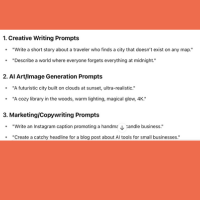 Prompt engineering can take a bit of time at first because your first instinct may not be the correct one. A few things to keep in mind:
- GPTs tend to be very literal, so be as specific as possible about what you want.
- Ask AI to explain what you want back to you before having it generate an image or product concept.
- Provide context when necessary to be sure your intentions are understood.
- Provide examples to illustrate what you want from the prompt.
These tips can help you create prompts that deliver the result you want on the first try and save time as you design new products to sell.
#3: Create Prompt Templates
 One of the best time-saving hacks we can provide is to save successful prompts and turn them into prompt templates. If you’re selling print on demand T-shirts, for example, you might save the prompt that got you what you want, so you can use it to have AI design your next shirt.
Keep in mind that a lot of Etsy shops sell multiple products with the same essential design. You might decide to create 12 mugs, each with a different zodiac sign. Once you have a design you want for one sign, you can use the prompt as a template to have AI create designs for the other 11.
#4: Use AI to Define Your Target Audience or Create a Customer Avatar
 Whether you’re just starting out as a product creator or you’ve been doing it for years, it’s useful and necessary to understand your target audience and design products they’ll love. Your audience may change over time, so even if you did this type of work when you first opened your shop, you can and should revisit it with AI.
Specifically, you can use AI tools to scrutinize your customer reviews, social media pages, and other information to help you drill down on who your core customers are and what they want. It’s a task that could take days if you did it without AI, but with AI you can get it done in a fraction of the time.
#5: Spend time creating an AI-powered workflow for product creation
 You don’t necessarily need to use AI for every step of the product creation process, which is why we recommend thinking about where and how to integrate AI tools into what you do. You might be someone who already has hundreds of product ideas in a Google sheet, so you might not need brainstorming assistance.
Start by identifying the parts of the process that are the most challenging or time-consuming for you. Then, you can start testing AI products to figure out the best way to use them to save time. It will likely require some trial and error, but once you’ve got the process nailed down and you know the best use of AI for your purposes, you’ll be creating products at lightning speed.
#6: Use AI to Create Product Mockups
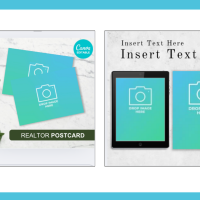 Your shop on Etsy or wherever you sell products needs to look professional to attract and retain customers. AI tools can help you create sleek and appealing product mockups to ensure that your shop has a cohesive appearance.
Your products are more likely to sell (and more likely to be featured in Etsy’s new AI-powered search collections) if they look great and your shop does, too. AI tools can help you shortcut the mockup creation process and list new products quickly.
#7: Find the Most Popular Product Categories
 Finally, remember that one of the keys to success selling digital products is understanding which niches and product categories present the most opportunity for you to earn income. AI tools can help you figure that out, and there are some designed especially for use with Etsy, such as Everbee, which does competitor analysis, and Sale Samurai, an AI-powered keyword research tool.
Unless you’re an SEO expert, this type of research can be laborious. AI can take the guesswork and the time out of the process, which can be helpful in identifying potential product categories and creating listings to help people find your products.
The bottom line here is that using AI tools in a smart way is one of the best things we’ve learned to help us create, list, and sell digital products.
Do you need some help saving time with AI tools? Check out AI Printable Automation, which comes with DFY products and templates to create digital products in seconds!