 Artificial intelligence is everywhere and there are always new AI tools to check out. Some people, particularly those who are new to product creation, may wonder when and how to use AI tools and whether using them can really translate to improved cash flow. We’re here to tell you that AI can absolutely help you increase your profits!
The trick, of course, is knowing when and how to leverage AI tools. There’s a method to it and it’s important to understand if you want to make the best possible use of AI. In this article, we’ll walk you through exactly how to streamline your process to make product creation easy and maximize your income.
Where Do You Need the Most Help?
Before you choose any AI tools to use or begin the product creation process, the first thing to do is to identify the areas of product creation or selling where you need the most help. Here are some of the most common problem areas.
Writing
 A lot of people struggle with writing. While you might have no issue dashing off an email or text, it’s a different thing to produce polished writing for use in products. Even something as seemingly simple as writing a journal prompt can feel overwhelming.
Image Design
 Image design is something that some people have a natural affinity for, while others don’t. If you find it difficult to create images to use for your products, or you’re never sure where to place design elements, then AI tools can help you.
Product Mockups
 Product mockups are an essential element to create a professional-looking shop. When you’re selling digital products, you’ll need uniform product mockups to present to your potential buyers. There are AI tools specifically created to help with this element of online marketing.
Product Descriptions
 Product descriptions must be well-written and professional. It’s common for online sellers to have difficulty identifying the best keywords to use and then, using them properly in their product descriptions. The same is true of finding hashtags, and AI can help with both.
Research
Research is, at least in theory, easy to do online. That said, it can be time-consuming and not everybody has the bandwidth to sift through multiple websites and resources and find what they need.
To get going, we suggest starting with the area where you have the most trouble and finding one or more AI tools to help you. We’ll provide some suggestions in the next section.
AI Tools to Try
 Here are some of our favorite AI tools to try broken down by category.
- Writing: Canva’s Magic Write, ChatGPT, Gemini, Grammarly
- Image Generation: Canva’s Magic Design, DALL-E, Openart.ai
- Product Mockups: Canva’s free mockup generator, Fotor, Mockey, Kitti
- Product Descriptions: ChatGPT, Copy.ai, Hypotenuse AI
- Research: Open AI Deep Research, Perplexity AI, Research Rabbit
Many of these tools come with a free option or at least a free trial period. We suggest taking advantage of any freebies first, since these can give you an idea of how the tool works and whether it’s worth paying for.
Choose a Product to Create
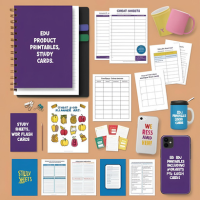 Next, you’ll want to choose a product to create. I love creating templates, since they’re easy to do and can be sold as many times as you want. Here are some other popular digital products that you can create with help from AI.
- Greeting cards
- Planners
- Journals
- Wall art
- Cheat sheets
- Study guides
- EDU printables, including worksheets and flash cards
- POD products such as t-shirts, mugs, and phone cases
All of these products lend themselves to AI-powered creation, which means once you have the right tools, you can boost your cash flow immediately.
Create a Workflow for Product Creation
Knowing which products you want to create and where you need the most help is a must. Now that you’re there, the next thing we suggest is creating a product workflow.
What do we mean by that? We’re talking about a step-by-step outline of what needs to be done to create a new product and list it for sale in your shop. Here’s what a workflow might look like for a journal.
- Create X journal prompts, one for each page.
- Design a journal page template to use.
- Place design elements on each page.
- Export your journal pages.
- Format pages for printing.
- Bundle pages into a single, downloadable file.
- Create one or more product mockups for your journal. (You may want to have a cover mockup, plus mockups of individual pages and anything else that comes with your journal, such as stickers.)
- Research keywords and hashtags to use in your shop.
- Write a detailed product listing.
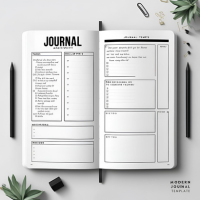 That might sound like a lot but consider the fact that you can use AI tools for each step. Here’s what we mean. You could use:
- Magic Write or ChatGPT to generate journal prompts
- Canva’s Magic Design to create a journal page template and place design elements on each page, and Canva to save journal pages, format them, and export them to your computer or tablet.
- Mockey to create professional-looking product mockups.
- ChatGPT to identify keywords and hashtags.
- Gemini to write a detailed product listing.
As you can see, some of these tools can be used in multiple ways, all of which can help you create products quickly and without a lot of fuss.
Spin Existing Products into New Products
Once you’ve created a product, the great news is that it’s easy to use the AI tools we’ve mentioned to spin each one into multiple new products.
For example, if you created one or more journal page templates in Canva, you could save them into a file and reuse them as many times as you want. You can switch up design elements easily with Canva’s Magic Studio AI tools, meaning that you could take one journal and in just a few minutes and with a few clicks, create a second one—and a third!
The takeaway here is that you don’t need to be a design or writing genius, or an expert in using AI, to leverage AI-powered tools and watch your cash flow increase. It’s just a matter of knowing which tools to choose and how and when to use them.
Canva’s one of my all-time favorite design tools. If you want to learn more about how to boost your cash flow with Canva, check out Canva Cashflow – Professional Templates Made Easy!